

Comparison of SNMP Agent Test Tools
Copyright © 2010 -2025 High Tech Momentum. All Rights Reserved.
All other trademarks and copyrights are the property of their respective owners.
Testing with an ‘SNMP Manager’ Isn’t Real Testing
The test engineer’s job is to ensure bugs are found before products ship, thus saving the company money and helping to build the company’s reputation for shipping quality products. Research has shown that fixing software problems after products have shipped can be up to 32-times more costly than finding and fixing bugs during a product’s testing lifecycle. For this reason, forward-thinking organizations understand the importance of system testing and the payback that results from doing comprehensive testing before products ship. Simple Network Management Protocol (SNMP) is a complicated body of functionality that enables products to be remotely monitored and managed. There are a number of approaches to testing this capability, and I set out in this report to experiment with the various alternatives to see how they might differ in delivering results.
Surprisingly, I found a whole suite of common testing approaches that found absolutely no bugs at all (thus completely failing to perform the job) or worse yet, reported false positives that turned out not to be bugs at all (hence requiring many hours of time to determine and prove that the reported errors are not real bugs). Testing with these tools would leave an organization with a false sense of accomplishment and security until customers start calling in problems.
Of all the products I tried, only InterWorking Labs’ SilverCreek product proved effective at finding legitimate bugs.
Introduction
If you’re in the business of developing or testing a product that supports the Simple Network Management Protocol (SNMP), I’m sure you’ve become aware of just how big a job it can be to test and verify new implementations as well as perform ongoing regression testing.
InterWorking Labs (IWL), the industry pioneer in SNMP test tools, recently commissioned me to play the part of an SNMP test engineer. It seems that a broad range of SNMP products are starting to be marketed as SNMP test and verification tools, and IWL asked me to survey the market and test a complete range of available offerings.
This report provides an overview of my experiences, which varied widely and yielded some surprising results.
Approach
I started my search much like you might – with a google search for “SNMP test tools”. I found a range of offerings, and I weaned my shortlist down to those tools claiming to be useful for testing and debugging.
I settled on five tools I thought best matched my criteria for this research. These included:
- InterWorking Labs’ SilverCreek
- Company A’s SNMP Test
- Company B’s SNMP MIB Viewer
- Company C’s SNMP Manager
- Company D’s WebNMS
InterWorking Labs SilverCreek
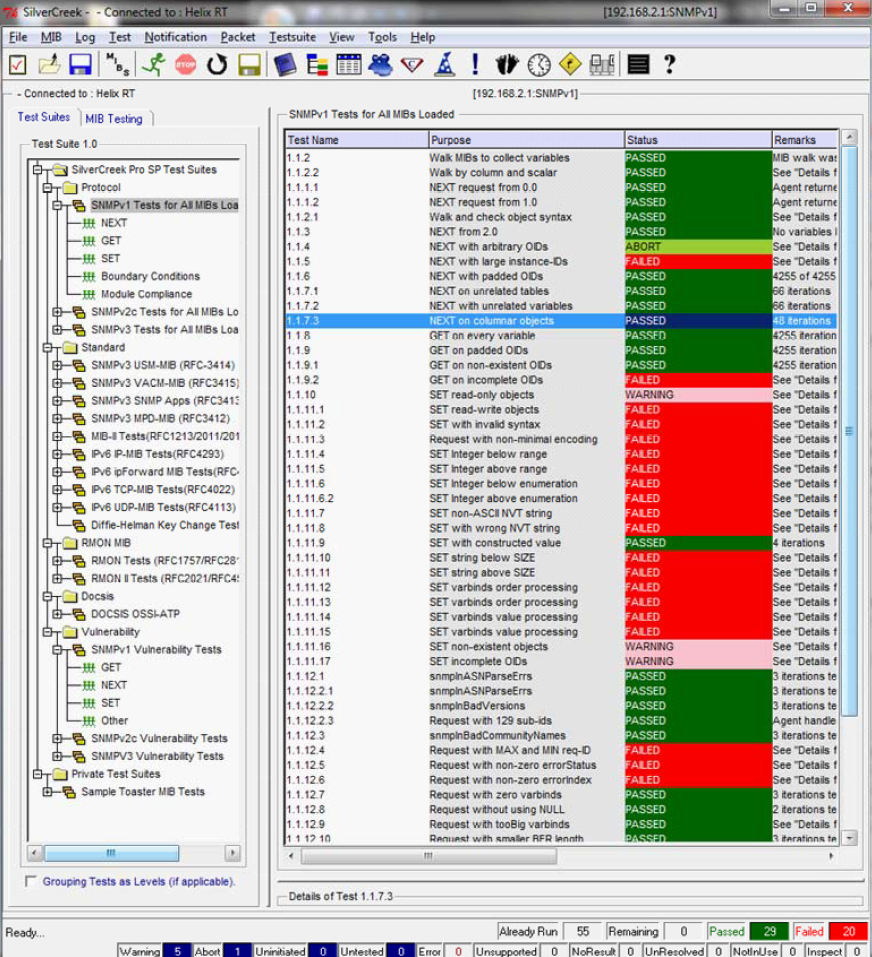
Installation of SilverCreek was straightforward although it did require that I obtain a license before I could begin testing. Once I installed the license, the tool started very smoothly, and I was able to start testing without the assistance of any documentation. The nicely organized user interface made it clear from the start that this was a serious tool intended to provide comprehensive SNMP testing of the device. The ‘MIB walk’ functionality that was largely the full extent of all but one of the other tools I tested was contained in just the very first of the 55 ‘protocol’ tests provided.
SilverCreek Test Results
Unlike other tools, SilverCreek automatically loaded a full suite of standard MIBs. This saved me lots of time and hassle. After configuring the SNMP agent IP address and clicking ‘Run’, SilverCreek commenced running its battery of tests. Almost immediately, SilverCreek reported an error:
Test 1.1.4 (NEXT with arbitrary OIDs) failed, the test description reading:
1.1.4 The purpose of this test is to verify that the agent can perform correct lexicographic ordering with non-variable arguments. This test is run on each variable returned in test 1.1.2. This test removes the rightmost sub-identifier each iteration and issues a GET-NEXT from the resulting OID, repeating until only two sub-identifiers are
remaining. For a variable such as 1.3.8.6.4, this means a GET-NEXT from 1.3.8.6, 1.3.8 and 1.3.

The expected outcome is that the agent returns the first variable greater than the argument.
Reference RFC 1157 § 4.1.3
No. 0 timeout 10
No. 1 timeout 10
Can't receive data from Socket, the agent is not enabled or may have crashed! Error ECONNRESE
After some investigation, it turns out that the SNMP agent appeared to have completely crashed to the point where it was no longer responsive to any requests. Getting
things working again required a hard reboot of the router being tested. After rebooting I continued by skipping the failed test in order to avoid repeating the crash.
This was the first example that was later repeated many times where SilverCreek found significant bugs in the agent that none of the other tools had identified. In all
SilverCreek found a number of bugs in the SNMP agent device, including:
- SNMP agent crash due to sending OIDs encoded with 32-bit numbers
- Bugs in the ‘8072’ private MIB returning values for non-existent OIDs
- Failures with SNMP packets where the length was not minimally ASN.1 encoded
- Failures with SNMP requests for extra large request-ids
- Failures with SNMP requests with non-zero values in the errorStatus or errorIndex field(s)
- Gaps in the MIB-II implementation were identified violating conformance guidelines
I came away feeling that SilverCreek had done a credible and thorough job testing the device. When tests failed, the built-in pop-ups explained each test’s goals,
procedures and rationale. The test results were all clear and helpful. The tool seems robust, complete and well designed for testing SNMP agents.
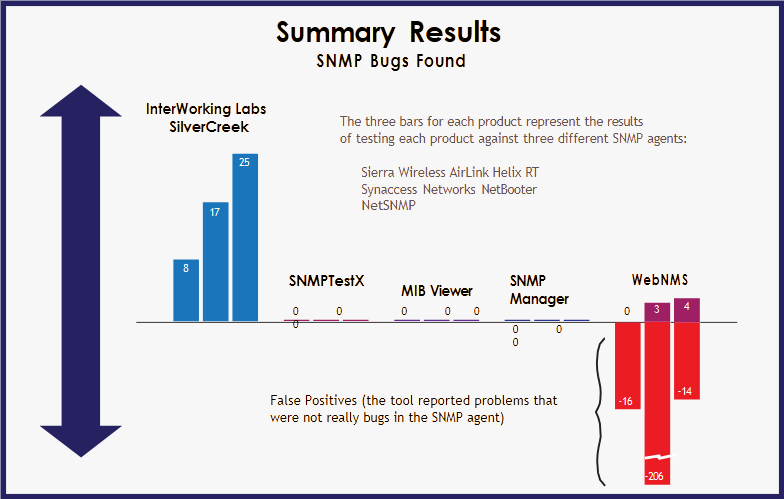
Comparison of SNMP Agent : SilverCreek consistently found more bugs without generating false positives
Verifying Results with Additional SNMP Agents
After completing my testing of all the tools against a single common agent I decided to try running all the tools against a few additional agents just to see if the
results would remain consistent across a variety of testing environments.
I tested all the tools against 3 SNMP agents:
- Sierra Wireless AirLink Helix RT with 4.1.0.010 software version 4.1.0.010
- Synaccess Networks netBooter series B, Part #1120 V2
- NetSNMP, the default SNMP agent available for Linux distributions
The results remained remarkably consistent across all the agents tested:
- The tools (general MIB browers and SNMP managers) made for managing networks (rather than specifically testing SNMP agents) continued to find no faults at all.
- Company D’s WebNMS seems to have particular problems with unsupported MIB objects. Whenever an agent failed to implement particular objects, WebNMS reports numerous errors even if the agent correctly returned the noSuchName error code as called for in the SNMP standards. This behavior generated massive numbers of false positive bug reports.
- SilverCreek was the only product to find bugs in all the SNMP agents. SilverCreek found the most bugs and did so without generating false positives.
SNMPv3 Testing
As a last step I ran a suite of SNMPv3 testing. Since this more advanced version of the protocol was only supported by a subset of the agents, I couldn’t use it exclusively
to perform all the testing, but since the NetSNMP agent supported SNMPv3 I decided to round out the testing by using both SilverCreek and WebNMS to perform SNMPv3 validation.
After much trial and error I was unable to get Company D’s WebNMS to successfully connect to the agent using the SNMPv3 protocol. Despite multiple attempts to get the WebNMS configured as well as contacting their support team asking for help, I was never able to successfully perform SNMPv3 testing with this tool. Even if I had been able to get it to run it appears that all the ‘functionality’ testing is limited to the SNMPv1 protocol, so I’m not certain how valuable SNMPv3 testing the WebNMS could provide.
SilverCreek connected to the agent using SNMPv3 without difficulty and ran a battery of SNMPv3-specific tests for both the SNMPv3 protocol and the SNMPv3 MIBs. SilverCreek found 24 additional SNMPv3 protocol bugs and 13 SNMPv3 MIB bugs for a total of 37 SNMPv3-related issues above and beyond all the bugs found in earlier
testing.
I was impressed with SilverCreek’s SNMPv3 support and the ease with which I was able to get this testing running. The implementation seemed thorough and complete.
Summary Results
SilverCreek was the only tool to find any legitimate bugs in all the tested SNMP agents. All other tools found no bugs at all or, in one case, identified many more
false positives than legitimate bugs. InterWorking Lab’s SilverCreek found the most bugs and it did so without generating any false positives.
Testing with an ‘SNMP Manager’ Isn’t Real Testing
Using an ‘SNMP Manager’ to do SNMP testing is clearly of little or no value. In my tests none of the SNMP Managers found even a single bug in any of the
agents even though later testing found numerous critical issues.
It is clear that SilverCreek was built from the ground up to thoroughly test SNMP agents. Furthermore, it ran gracefully in a variety of agent environments automatically
adjusting its behavior to the specific MIB objects implemented by each agent.
For developers and quality assurance engineers, there is a clear and demonstrable difference between the various classes of test tools. Any organization wishing to ship a stable and reliable product would clearly be better off using a robust test suite like SilverCreek.
Real SNMP Testing Yields Real Results
The cost of licensing SilverCreek would, in all likelihood, be recouped many times over by resulting cost savings realized later in the product cycle. Finding bugs before a product gets in the hands of the customer saves both soft and hard costs.
Product failures erode customer confidence as well as cost up to thirty times more to fix in the field. Finding and fixing just one additional bug before a product ships could pay for the additional cost of using a premium tool like SilverCreek.
SegueSoft Inc. (SSI) has acquired all rights to SilverCreek, Maxwell Pro TCP/IP Tests, and the IWL MQTT Tests from InterWorking Labs, Inc. (IWL).
This document references content originally developed by IWL, now authorized for SSI’s use under the acquisition agreement.