

SilverCreek SNMP and MIB Tools
SilverCreek MIB Tools
SilverCreek MIB Tools include MIB Compiler, MIB Browser, MIB Walker, MIB Table Inspector, MIB Compare, and MIB Dictionary. These tools make it easy for customers to validate MIB syntax, explore agent implementations, and quickly locate MIB object definitions, streamlining troubleshooting.
MIB Compiler
The MIB compiler will compile private and standard MIBs. Problems and errors are flagged and may be saved for later inspection. Conventional MIB compilers hide or suppress these errors to eliminate support questions from the users. This compiler, in contrast, will provide details on all the problems in the MIB design, so that you can fix those problems prior to shipment.
- Add and compile any MIB (private or standard)
- Automatically compile and load multiple MIBs (all at once)
- Add and compile an agent-capability MIB
- Select one or more branches of MIBs for testing
- Automatically test your private MIBs

MIB Browser
The MIB Browser provides a colorful, graphical tree structure so that you can browse the MIB and inspect various branches and leaf nodes. The object name, value, and syntax are displayed in a table for easy study and review. Results may be saved and/or printed for later reference.

SNMP MIB Walker
The MIB Walker takes an active approach to your agent by retrieving the exact value of each object and each instance of each object in your MIB. The MIB Walker can walk through the entire tree or you can scope out a section, group or branch . You can also put together combinations of groups or sections to customize the information for your needs. Results may be saved and/or printed for later reference. The MIB Walker will also find lexicographic ordering errors in your MIB structure. This is a fundamental concept yet common source of errors in Secure SNMP protocol implementations. The SNMP MIB Walker provides the information to detect and correct these errors prior to shipping your product.
MIB Table Inspector
The SilverCreek MIB Table Inspector is an SNMP tool allowing the user to view MIB table content in a conceptual table view. It also provides an improved user friendly interface to update, delete, test columnar objects and insert rows in the selected MIB Table. It supports createAndGo and createAndWait row creation methods.

MIB Compare Tool
This tool may be used to compare two MIB files to find the semantic differences, rather than syntactic differences. This gives the user an opportunity to quickly see major changes – added objects, redefined objects, etc. rather than having to plow through all the minutiae contained in a syntactic comparison.
- The MIBS files can be in raw format, including those which are available inline in an RFC, file file suffixes such as .mib, .txt, .tmp, .defs, etc.
- Shows semantic differences in a user-friendly table format.
- Uses colors to indicate the type of change, i.e., modified, deleted, or added.
- Verbose mode makes the semantic differences easier to understand.
- Saves results in the popular Unix diff format.
- Saves comparison differences as CVS or TAB-delimited files for further analysis.
- Re-compares the files if externally modified after initial comparison.
MIB Dictionary
The SNMP MIB Dictionary provides a very convenient way to quickly access all related information about loaded MIBs:
- Look up the name for any given OID.
- Look up OID for any given name.
- See which MIB module and definition file an object is defined in as well as its parent nodes.
- See related information about MIB tables. “i.e. index objects and all objects defined in this table”
- See which notifications are defined in each MIB.
- See all the known notifications that are loaded.
- Look up which objects are defined in each MIB.
- See information about individual modules. (related definition files, standard track or enterprise MIB, and last update date)
- Save lookup results into a tab delimited text file for easy loading into Excel for further analysis.

SilverCreek SNMP Tools
SilverCreek SNMP Tools include the SNMP Command Tool, Notification Table Configurator, Trap Tester, Packet Recorder and Decoder, and Packet Trace. Advanced Tools include SNMP Command Wizard, Command Tcl Script Generator, USM Manager, Polling Tool, Memory Leak Tool, Performance Measuring Tool, and Test Automation Wizard. Together, these powerful tools make it easy to send SNMP requests, validate traps, capture SNMP packets, run tests and streamline troubleshooting.
SNMP Command Tool
Issue SNMP commands — GETs, SETs, NEXTs, and/or GET-BULK requests — to a specific MIB object. For example, “SET” the name of sysContact to a value representing the contact person for the network device.
Send SNMP GET, NEXT, SET requests
Configuring SNMP Notification Tables Tool
SNMPv3 (See SNMP recap and overview) can be very difficult to set up and configure, primarily due to the many components and the need to keep track of them and their relationships to each other. The Configuring Notification Tables Tool greatly simplifies this task.
Cleanly and efficiently create notification targets and the target parameters, specifically securityModel, securityLevel, and SecurityName to associate with the targets. Create notification filters to associate with the targets.
This tool highlights the relationship among the tables by highlighting the associated rows in other tables, giving the user easy to follow, visual cues for tracking the relationship.
- Show Current Setting and Table Relations
- Create Notification Names
- Create Notification Targets
- Create Notification Targets Parameters
- Create Notification Files
- Create Community String Mappings
SNMP Notification Monitor (SNMP Trap Tester)
When devices on a network experience certain problems (e.g. link down), they will send an SNMP trap or notification to the management application. The Notification Monitor listens for these traps and displays them in the a window. This SNMP tool also checks and verifies each trap for protocol compliance. Thus, you can verify that the traps in your product are correctly implemented.
CSV or tab delimited output can be imported into a spreadsheet (e.g. Excel)
Check variables bindings of received notifications for correct syntax type, range, size, instance identifiers and order.
Support listening on multiple ports for traps and informs
Synchronize with, and receive encrypted traps from SNMPv3 notification originator
Option to skip check time window for SNMPv3 notifications
SNMP Packet Trace
SilverCreek’s SNMP tools: Packet Summary, Packet Watch and Packet Debugging — provide as much detailed, low-level information as you need.
SNMP Packet Recorder and Decoder
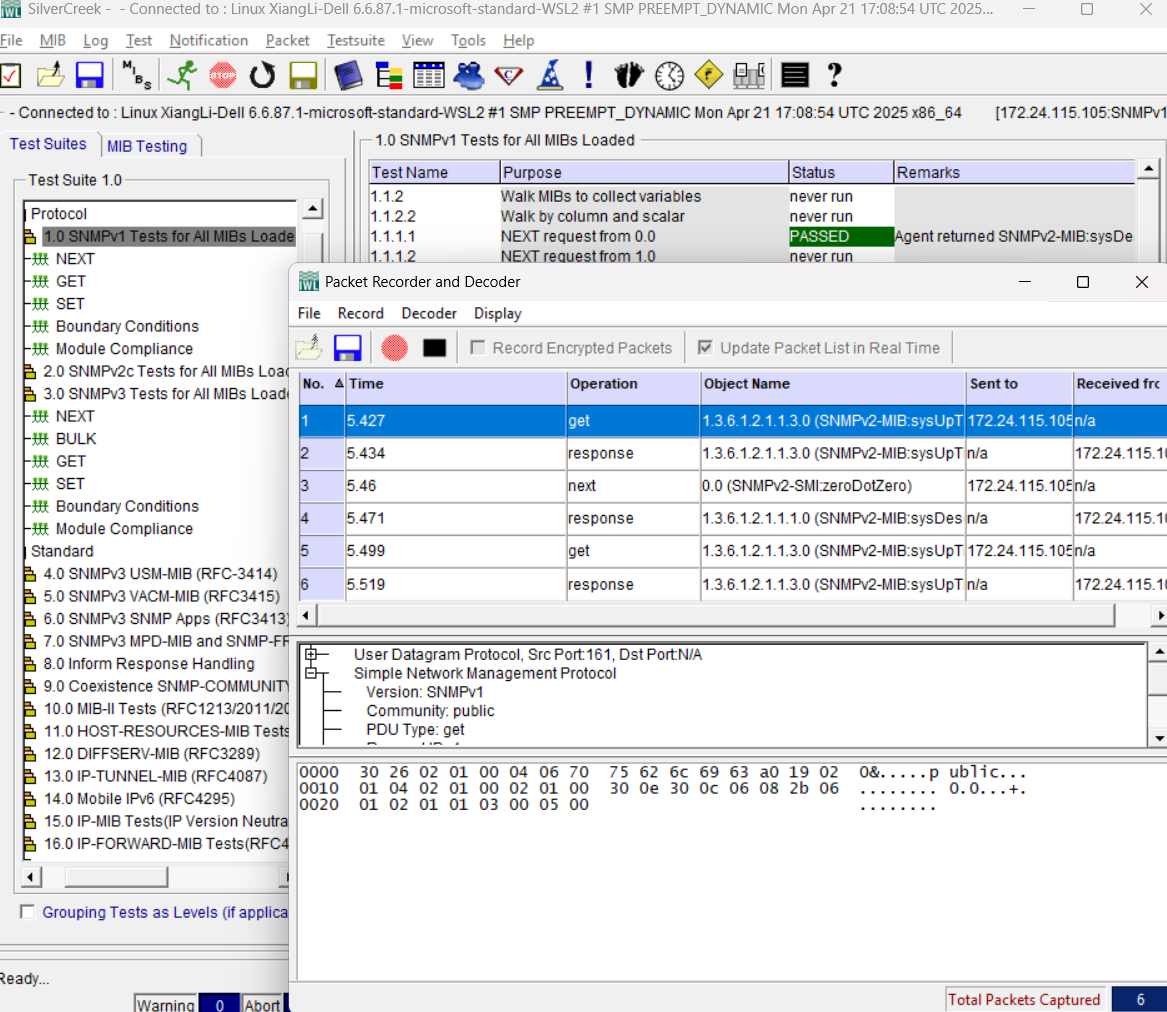
The SNMP Packet Recorder and Decoder allows you to record packet traffic going to and from SilverCreek. Using this tool you can even record and view encrypted SNMPv3 packets. A regular packet sniffer can’t do that easily.

SNMP Command Wizard
Put together a sequence of SNMP commands or operations and save this sequence in a script for later use. Easily build a script that performs GETs, SETs, NEXTs, and/or GET-BULK requests on several MIB objects. Check and verify sequences of anticipated user behaviors or the behavior of a management application with the SNMP Command Wizard.
- Save and load previous command sets
- Send SNMP GET, NEXT, SET, GET-BULK requests
- Send a series of requests with multiple objects

SNMP Command Tcl Script Generator
Easily create and run simple test cases without actually writing any Tcl scripts! With the Tcl Script Generator, you can point and click to build scripts to execute a series of GET, GET-NEXT, SET, and GET-BULK commands to test scalars (objects not in a MIB table) and columns (objects in MIB tables). This includes generating scripts to exercise rowStatus transition. Create multiple context in your scripts to access multiple devices under test or a single agent with different access levels.
- Resulting test script may be added to SilverCreek Test Suite
- Build test scripts automatically (without programming knowledge)
- Create one or more agents to test
- Send SNMP GET, NEXT, SET, GET-BULK requests
- Test both scalar and columnar (table) objects
- Exercise row creation and row status transition for any table
- Write verification on read-write objects using allowable values
SNMPv3 USM Manager
The SNMPv3 USM Manager tool allows you to create new USM users, create and delete VACM view names, assign views to users and update users’ secret keys (or passwords). This SNMP tool greatly simplifies the process of updating a SNMP agent’s User-based Security Module (USM) table as well as the View Based Access Control Model (VACM) tables. You can create new users, assign a new user to a group, assign a MIB view to a group of users, test users, and update user authentication and encryption passwords.
- Test and Delete User
- Show table relations among the five key tables (USM and VACM)
- Create a new user, assign user to group, assign MIB views to group
- Key Change
- Manage MIB View Names
SNMP Polling Tool
Sample the value of a SNMP MIB object instance or multiple MIB object instances over time. Visually inspect and verify that counters are incrementing or other values are changing in an appropriate way.
- Tab delimited output can be imported into a spreadsheet (e.g. Excel)
- Poll selected objects via GET, GET-BULK, and Walking Branch
- Modify interval and duration of polling for load testing

SNMP Memory Leak Tool
Some SNMP agent implementations have been discovered that do not properly release allocated memory resources after they have responded to GET or GET-BULK requests that request an object in non-lexicographic order. One way to diagnose whether an agent has such leaks is to issue a large number of queries and examine the memory used by the agent before and then after the queries. The Memory Leak Tool was created as a quick and convenient way to issue such queries.
The Memory Leak Tool allows you to issue repeated GET, NEXT or GET-BULK commands on a set of objects or WALK the entire MIB for any given length of time, a number of predefined iterations, or an unlimited number of times. Usually you should start by “Walking the whole MIB” repeatedly to see if the memory leak exists in the agent under testing.
SNMP Performance Measuring Tool
Measure the response time to certain operations with one network device and then compare that to another device. This is useful for understanding performance issues and problems with a network application, the network itself, or the device itself. Create scripts and run the scripts against several devices and then compare the output results to determine where performance bottlenecks exist and even what device performs best. This SNMP tool assists in characterizing agent performance issues.
Tab delimited output can be imported into a spreadsheet (e.g. Excel)
- Measure performance of GET, NEXT, SET, GET-BULK
- Measure performance of walking a MIB branch via NEXT, GET-BULK
- Measure performance of any scalar and columnar (table) objects
- Send both synchronously and asynchronously

SNMP Automation Wizard
The SNMP Automation Wizard allows the user to create automated scripts, edit them, save them, and run them by a simple graphic point and click process. There is no need to look at the code or use a scripting language, although full source code, APIs, and libraries are available for all the tests. The tester simply specifies the agent under test, the type of output desired, and the individual tests or collections of tests to include. This script is saved and can be re-invoked for regression testing. Multiple agents and multiple scripts can be automated through this SNMP tool.

© Copyright 2021 InterWorking Labs, Inc. dba IWL.
SegueSoft Inc. (SSI) has acquired all rights to SilverCreek, Maxwell Pro TCP/IP Tests, and the IWL MQTT Tests from InterWorking Labs, Inc. (IWL).
This document references content originally developed by IWL, now authorized for SSI’s use under the acquisition agreement.